PrintReadyCover

KDP Cover Calculator and Template Generator

For authors printing a paperback or hardcover through Amazon KDP. Enter your book's details for the exact cover size and a free template, then check your finished PDF before you upload it.

Your book

Binding

Check your finished cover

Waiting for a cover

  • Page size–
  • One page–
  • Text inside safe area–
  • Spine text–
  • Barcode area–
  • Artwork near trim–

Colour, fonts and image resolution aren't checked yet.

Full cover width

12.700in

322.6 mm · 3,810 px

Full cover height

9.250in

234.9 mm · 2,775 px

Spine width

0.450in

11.4 mm · 135 px

Spine text

Allowed

80 pages or more

Your cover, to scale

Example artwork. Pixels are at 300 DPI.

A coastal town. A missing boat.

When the sea gives back what it took, one family must decide what the truth is worth.

The Long Tide

The Long Tide

Mira Calloway

Barcode
Bleed
Extra artwork past the cut. It gets trimmed away.
Trim
Where the printed book is cut.
Safe area
Keep words and logos inside this line.
Spine
Its width depends on your page count.

What this tool is for

Amazon KDP prints a book each time someone orders one. Before it can, it needs your cover as one flat PDF, with the back, spine and front side by side. KDP's previewer can show a cover without flagging a problem, and its full quality review happens after you submit.

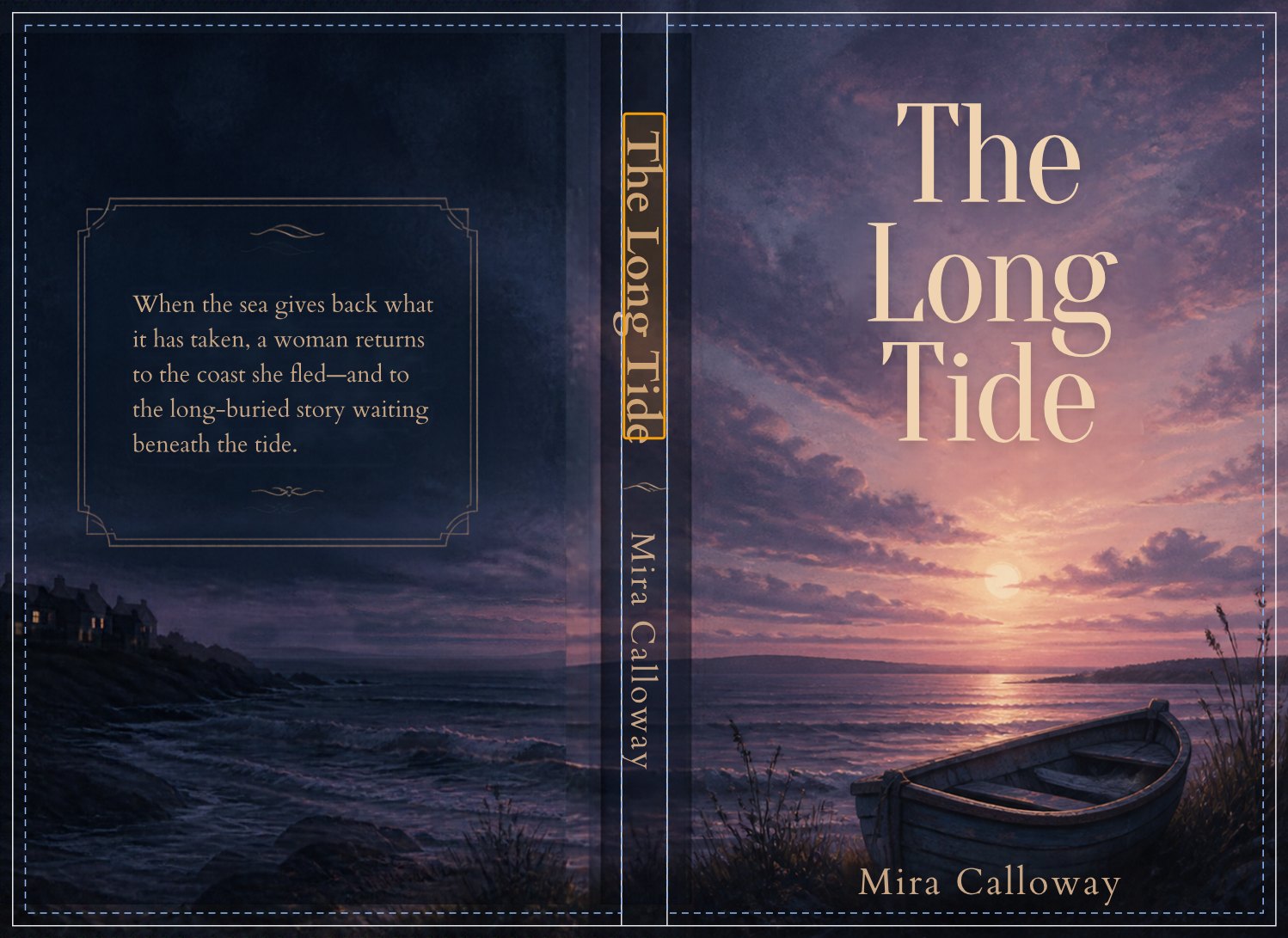
A dusk seascape book cover with white trim lines, blue safe-area lines and an amber box around the spine title
A real cover made in Canva, checked here. The amber box marks a spine title sitting close to the fold.

Get your exact size

Enter your trim size, page count and paper. The width, height and spine update as you type.

Design on the template

Download it as a PDF or PNG, then place it in your design app as a guide layer.

Check before you upload

Add your finished PDF. Any problems are outlined on your cover, right where they are.

KDP cover size formula

A paperback cover is one sheet. Add up each part from left to right. This 6 x 9 paperback has 200 pages on white paper.

0.125
Bleed
6.000
Back
0.450
Spine
6.000
Front
0.125
Bleed
12.700 in
Full width

Height is simpler: 0.125 + 9 + 0.125 = 9.250 in.

KDP spine width by paper type

Multiply your page count by the figure for your paper.

InteriorInches per page
Black ink, white paper0.002252
Black ink, cream paper0.0025
Black ink, groundwood paper0.00235
Standard colour, white paper0.002252
Premium colour, white paper0.002347

Cover sizes for common trim sizes

For a 200-page book on white paper. Sizes in inches.

Trim sizeSpineFull cover
5 x 80.45010.700 x 8.250
5.5 x 8.50.45011.700 x 8.750
6 x 90.45012.700 x 9.250
7 x 100.45014.700 x 10.250
8.5 x 110.45017.700 x 11.250

KDP hardcover cover size

Hardcovers are printed on a wrap that folds around a stiff board, so the file is much bigger than the book. A 6 x 9 hardcover with 200 white pages needs a cover 14.214 x 10.417 in, with a 0.639 in spine.

KDP offers five hardcover trim sizes: 5.5 x 8.5, 6 x 9, 6.14 x 9.21, 7 x 10 and 8.25 x 11. Choose Hardcover in the calculator for your exact size.

WrapFolds around the board on every side
0.591 in
Board sizeWider and taller than the pages
Trim + 0.197 x 0.236 in
HingeKeep text out, beside the spine
0.394 in
SpineSame paper figures as paperback
Pages x paper + 0.189 in
Page countWhite, cream or premium colour
76 to 550
The Long TideYour text stays in hereBleed: cut awayTrim marginSafe area
The corner of a cover, enlarged. Bleed and margin are each 0.125 in.

KDP margins, bleed and safe areas

Background art runs right to the edge of your file. The book is then cut at the trim line, and that cut can move slightly, so keep anything people need to read inside the safe area.

BleedTop, bottom and outside edges
0.125 in
Text marginInside the trim line
0.125 in
Spine clearanceEach side of the spine text
0.0625 in
Barcode boxLower right of the back cover
2 x 1.2 in
Smallest textAnywhere on the cover
7 point

Why KDP rejects covers, and how to fix them

KDP reviews your files after you submit them, and it says spine text, bleed, margins and embedded fonts are common reasons for rejection. The checker looks for the problems below before you get that far.

The cover is the wrong size
The page count probably changed after the cover was made. In our test, KDP's previewer resized a wrong-size cover without any warning, which moves the spine. Rebuild on a new template instead.
Text is too close to the edge
Move titles, author names and small print inside the dashed safe area. Background art can run off the page, but anything people need to read cannot.
Spine text on a short book
Amazon's guidance needs at least 79 pages, and Cover Creator asks for 80. Near that line, leave the spine blank or add a page.
Text is covered by the barcode
KDP adds a 2 x 1.2 in white box in the lower right of the back cover. In our test it covered the text underneath without any warning. Keep that corner clear, or supply your own barcode.

Making your KDP cover in Canva

Canva works well for KDP covers if the page size is right. We ran a real Canva cover through this checker to test these steps.

  1. Set the size. Create a custom design at the full cover size shown above, in inches.
  2. Add the template. Download the PNG, upload it to Canva and stretch it to fill the page.
  3. Design over it. Build your cover, then delete the template.
  4. Export. Download as PDF Print with Crop marks and bleed turned off. Your full cover size already includes bleed, and that option makes the PDF bigger.
  5. Check it. Drop the PDF into the checker before you upload it to KDP.

KDP cover questions

Sizes last compared with Amazon's cover calculator on 2 November 2026.

Can't find your answer?Send us a message

What size should my KDP cover be?

Your cover width is twice your trim width, plus the spine, plus 0.25 in of bleed. Your cover height is your trim height plus 0.25 in. Enter your book above for the exact figures.

How do I calculate spine width for KDP?

Multiply your page count by the thickness of your paper. White paper is 0.002252 in per page, and cream paper is 0.0025 in.

Does a KDP cover need bleed?

Yes. KDP covers need 0.125 in of bleed on the top, bottom and outside edges, so the artwork can run past the cut line.

Do I need a new cover if my page count changes?

Usually, yes. The spine width changes with the page count, which changes the file size and moves the front cover.

Does this work for hardcovers?

Yes. Choose Hardcover in the calculator. It covers KDP's standard printed hardcover. If you need a dust jacket, check the size with Amazon's calculator.

Is my file uploaded?

No. Your browser reads the PDF on your device, and the file is never sent to us. We count page visits, but that doesn't include your file.

KDP's previewer shows no errors. Am I safe?

Not necessarily. KDP says its full quality review happens after you submit. In our tests, the previewer showed no errors for covers with text past the safe line, text under the barcode, or the wrong size.

Does a pass here mean KDP will accept my cover?

No. This is an unofficial check, and it doesn't cover colour, fonts or image resolution yet. Always review your file in KDP's print previewer.